
SWN Login Guide
Follow this step-by-step guide to connect your mobile phone to the SWN Wi-Fi network using your IAMS account.
School Users may connect to SWN Wi-Fi network to access internet for teaching and learning purpose.
Note:
You must have at least change your password before accessing the SWN WiFi on your phone. You can change your password using a SSOE device at the library.
You can’t login to more than one device using the same account at the same time.
Please remember to logout from SWN at http://portal.swn.moe.edu.sg when you have finished using the connection.
Your IAMS password will expires every 90 days.
To connect to SWN Wi-Fi:
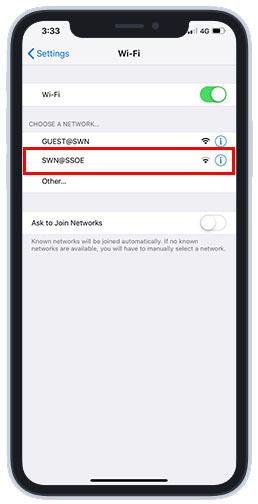
1. Go to "Wifi" under "Setting" on your mobile phone.
2. Select "SWN@SSOE" from available Wi-Fi network list.
(If you're unable to see the network on your phone, it may only supports the 2.4Ghz Frequency. MOE has deactivated the 2.4 GHz frequency band from our wireless network with effect from 1 April 2021.)
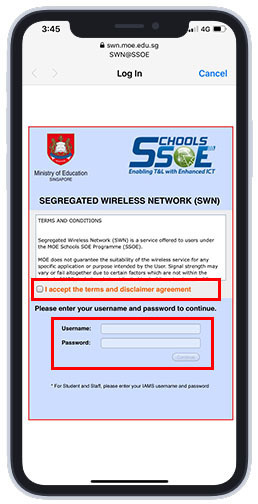
3. Once connected, a login page will pop up.
Login using your IAMS account. (Remember to check on the box to agree the T&C.)
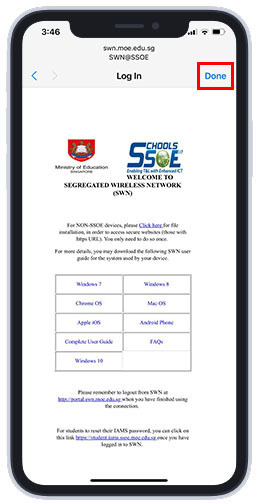
4. If you have the certificates installed, you may press the "Done" button. Otherwise, please proceed to step 5.
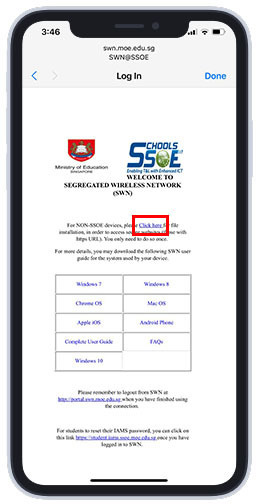
5. If you are connecting to SWN on the mobile phone for the first time, select "Click Here" to download and install the MOE-SSL certificate. (You only need to do so once.)
6. Press the "Install" button when you see the "Install Profile" page.
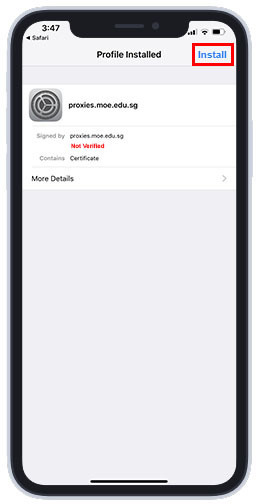
7.You will need to enter your passcode for the installation to start. If your phone is not protected with a passcode, you will be prompt to create one.
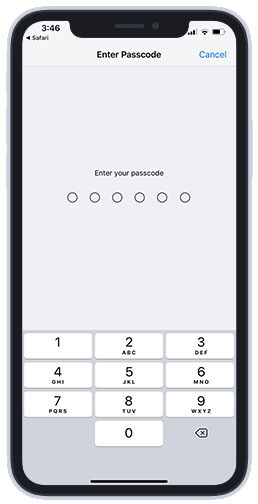
8. Press the 'Install' button after you have entered your passcode.
9. Press "Done" to complete.
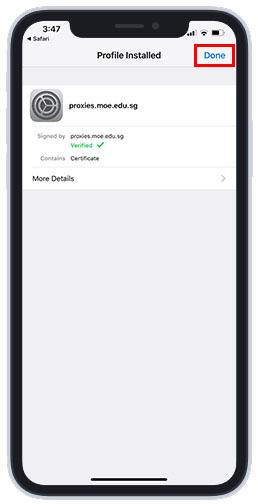
10. Your device should be connected to the SWN@SSOE Network.